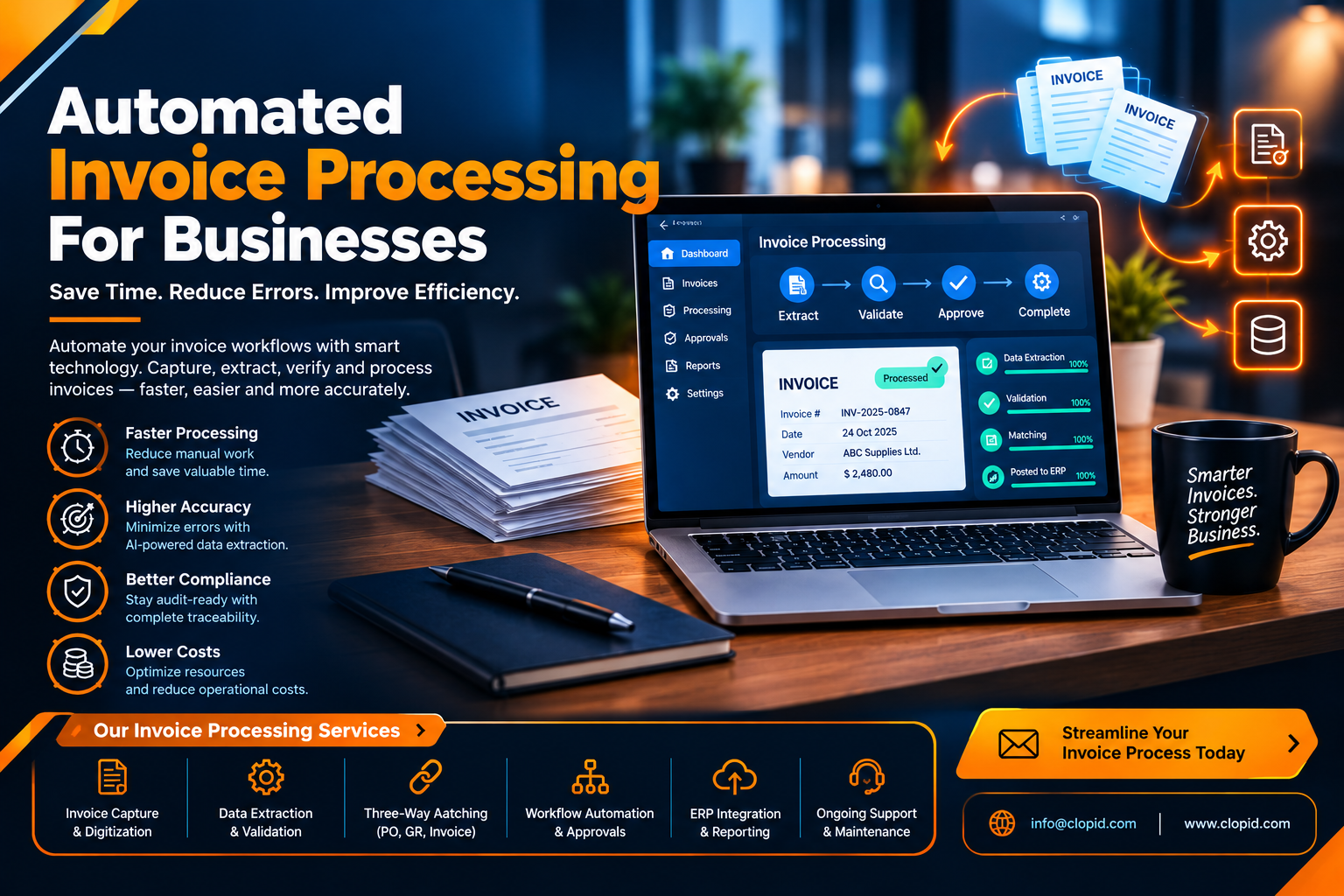
Automated Invoice Processing for Businesses
Introduction
Managing invoices is an important part of every business. From receiving supplier bills to checking payment details and maintaining financial records, these tasks require time and attention. When businesses handle invoices manually, they may face delays, data entry errors, misplaced documents, and difficulties tracking payments.
Automated invoice processing helps businesses manage these activities with less manual effort. By using software to capture invoice information, organize records, and support approval workflows, companies can make their financial operations faster and more consistent.
With the right software development approach, businesses can build invoice processing systems that match their workflows, improve record accuracy, and support better financial management.
What Is Automated Invoice Processing?
Automated invoice processing is the use of software to handle different stages of invoice management. These stages may include receiving invoices, extracting information, validating details, routing invoices for approval, and updating accounting records.
Instead of entering every detail manually, employees can use digital tools to process invoice data and identify items that need further review. Depending on the system, automation may use optical character recognition (OCR), predefined rules, workflow automation, or integrations with accounting software.
The level of automation depends on the business requirements, invoice formats, and existing financial systems.
Why Businesses Need Invoice Processing Automation
1. Reduce Manual Data Entry
Manually entering invoice numbers, supplier details, dates, tax amounts, and payment totals can take considerable time. Repeating these tasks across hundreds of invoices also increases the possibility of human error.
Automated systems can extract relevant information from supported invoice formats and populate the appropriate fields. Employees can then review the extracted data instead of entering every detail from scratch.
2. Speed Up Invoice Approvals
Invoices may remain unpaid because they are waiting for the correct manager or department to approve them. Manual follow-ups can make the process even slower.
An automated workflow can route invoices to the appropriate approver, send reminders, and record approval status. This helps teams identify pending invoices and reduce unnecessary delays.
3. Improve Financial Record Accuracy
Incorrect invoice details can create problems during reconciliation, reporting, and payment processing. Automated validation rules can check required fields, compare invoice details with purchase orders, and flag possible duplicates.
These checks help employees identify discrepancies before an invoice moves to the next stage. Human review remains important when information is incomplete or a system detects an unusual transaction.
4. Improve Invoice Tracking
Businesses need to know whether an invoice has been received, approved, scheduled for payment, or paid. When records are spread across emails, spreadsheets, and paper files, finding this information can be difficult.
A centralized invoice processing system provides a clearer view of invoice status and helps employees locate supporting documents when needed.
How Automated Invoice Processing Works
A typical automated invoice workflow follows a series of steps.
Step 1: Invoice Collection
Invoices are received through email, supplier portals, document uploads, or other approved channels. The system collects the documents in a central location.
Step 2: Data Extraction
The software extracts relevant information, such as the supplier name, invoice number, invoice date, line items, tax details, and total amount.
Step 3: Data Validation
The extracted details are checked against predefined rules, supplier records, purchase orders, or other available information. Missing fields, mismatched totals, and potential duplicates can be flagged for review.
Step 4: Approval Routing
Once the invoice passes the required checks, the system sends it to the appropriate person or department for approval. Exceptions can be directed to employees who are responsible for resolving them.
Step 5: Accounting and Payment Updates
Approved invoice details can be transferred to compatible accounting systems. Payment status can then be updated according to the business's payment process and system integrations.
Step 6: Record Keeping
The invoice and its processing history are stored for future reference, reconciliation, and audit requirements.
Benefits of Custom Software Development for Invoice Automation
Every business has its own financial processes, approval structures, and reporting requirements. A standard application may not support every workflow a company needs.
Custom software development can help businesses create invoice processing solutions that fit their existing operations. A tailored system may include specific approval rules, supplier portals, accounting integrations, custom dashboards, and notifications.
Software developers can also help connect different business applications, reducing the need to transfer invoice information manually between systems.
Businesses planning to improve their financial workflows can explore software development services at https://www.riotechsoftwares.com/softwaredevelopment.php.
Common Challenges and How to Address Them
Although automation can improve invoice workflows, businesses should plan carefully before implementing a new system.
Different invoice formats: Use document extraction tools that support the formats suppliers commonly provide, and review uncertain results manually.
Incorrect extracted data: Apply validation rules and require additional checks for important financial fields.
Integration difficulties: Assess existing accounting software and business applications before choosing an automation solution.
Employee adoption: Provide training and clear instructions so employees understand the new approval and exception-handling process.
Security concerns: Establish appropriate permissions, audit logs, and payment verification procedures.
Unclear workflows: Document the current invoice process and define approval responsibilities before automating it.
A phased implementation can help businesses test the workflow, resolve issues, and expand automation gradually.
Frequently Asked Questions (FAQs)
1. What is the main purpose of automated invoice processing?
Its main purpose is to reduce repetitive manual work involved in collecting, entering, checking, approving, and recording invoices.
2. Can invoice processing automation reduce errors?
Yes. Data extraction, validation rules, and duplicate checks can reduce common manual errors. However, extracted information still requires suitable verification, especially when documents are unclear or contain unusual details.
3. Is invoice automation suitable for small businesses?
Yes. Small businesses can benefit from simpler invoice automation tools that help organize documents, track approvals, and reduce manual data entry. The solution should match their budget and invoice volume.
4. Can automated invoice processing integrate with accounting software?
Many solutions support integrations with accounting and ERP systems. Compatibility depends on the software, available APIs, and the business's specific requirements.
5. How can businesses measure the success of invoice automation?
Businesses can monitor processing time, data correction rates, approval delays, duplicate detection, and the number of invoices processed per employee. Comparing these indicators before and after implementation helps evaluate the results.
Conclusion
Automated invoice processing helps businesses improve financial workflows by reducing repetitive data entry, organizing invoice records, and supporting faster approvals. Features such as data extraction, validation, accounting integrations, and payment tracking can make invoice management more efficient.
Successful implementation requires suitable software, clear approval rules, reliable integrations, and strong security controls. By choosing an approach that fits their operational needs, businesses can reduce administrative work and improve visibility into their financial processes.
To explore software solutions that can support business automation and digital workflows, visit https://www.riotechsoftwares.com/softwaredevelopment.php.
Recent Posts
28 Oct 2026
27 Oct 2026
26 Oct 2026
23 Oct 2026