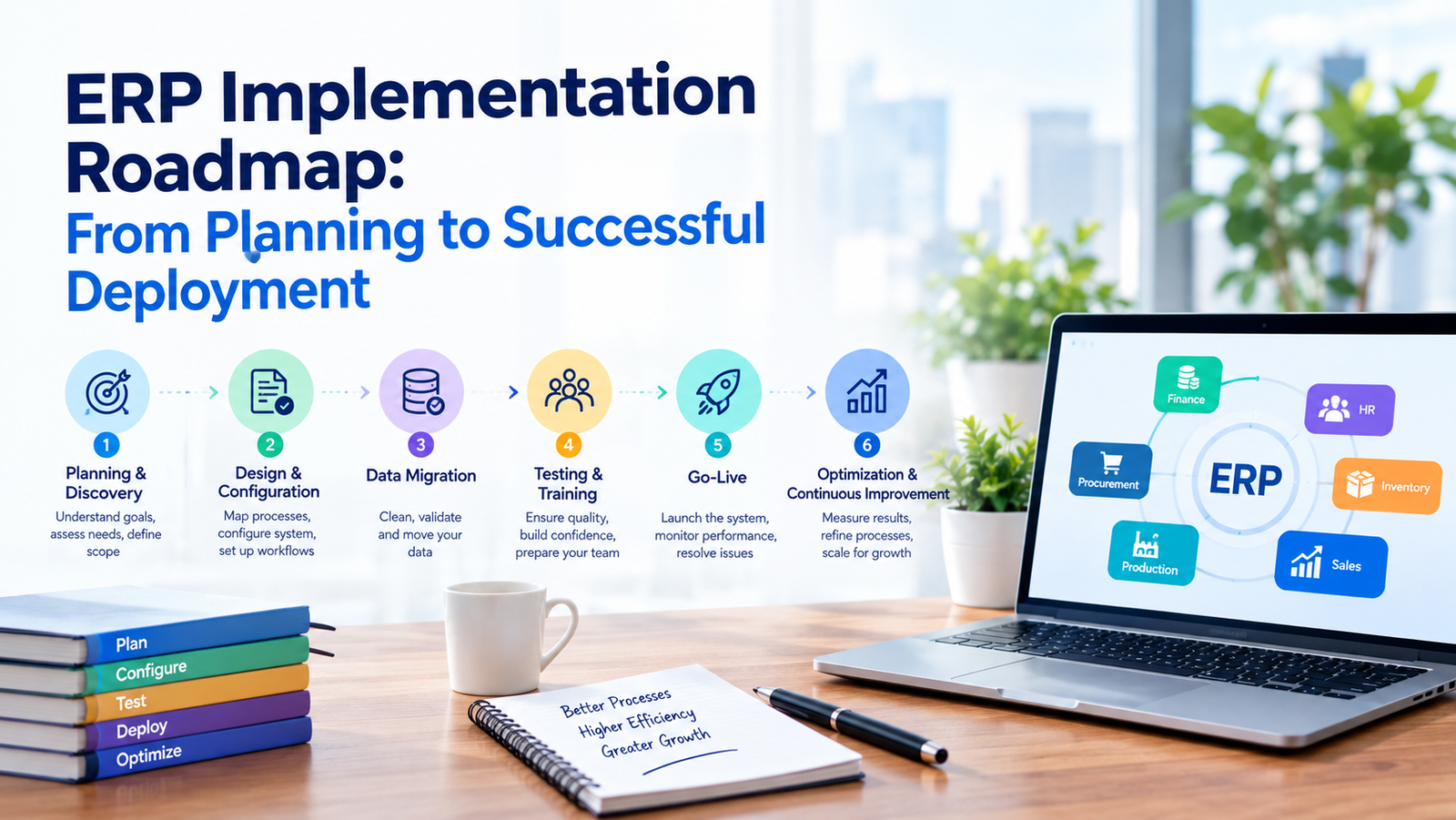
ERP Implementation Roadmap: From Planning to Successful Deployment
ERP Implementation Roadmap: From Planning to Successful Deployment
Enterprise Resource Planning (ERP) systems help businesses bring critical processes such as finance, inventory, procurement, sales, human resources, and operations into a connected digital environment. However, implementing an ERP system is not simply a matter of installing software. It requires careful planning, process analysis, data preparation, user training, testing, and ongoing support.
A structured ERP implementation roadmap can help organizations reduce implementation risks, improve user adoption, and ensure that the new system supports long-term business objectives.
What Is ERP Implementation?
ERP implementation is the process of planning, configuring, deploying, and integrating an ERP solution within an organization. The process typically involves multiple departments and can include business process analysis, system configuration, data migration, integrations, testing, employee training, and post-deployment support.
The objective is not just to introduce new software but to create a more connected and efficient business environment.
Why a Structured ERP Implementation Roadmap Matters
ERP systems often become central to daily business operations. Poor planning can result in data inconsistencies, operational disruption, user resistance, unexpected costs, and delays.
A clearly defined roadmap helps organizations:
- Establish measurable implementation goals
- Identify business and technical requirements
- Prepare teams for process changes
- Manage data migration effectively
- Reduce implementation risks
- Coordinate different departments
- Track project progress
- Improve user adoption
- Plan post-launch support
ERP Implementation Roadmap: Key Stages
1. Define Business Objectives
The first step is to determine why the organization needs an ERP system.
Businesses should identify specific challenges they want to address, such as disconnected systems, manual data entry, limited reporting, inventory inaccuracies, inefficient procurement, or difficulties managing multiple locations.
Clear objectives provide a foundation for selecting and configuring the ERP system.
For example, an organization may aim to:
- Improve financial visibility
- Automate repetitive processes
- Centralize business data
- Improve inventory management
- Streamline procurement
- Strengthen reporting and analytics
- Improve collaboration between departments
2. Assess Existing Business Processes
Before implementing an ERP platform, organizations should evaluate their existing workflows.
This stage involves documenting how departments currently manage tasks and identifying inefficiencies, duplicate processes, manual activities, and information gaps.
Business process assessment can help determine which processes should be retained, improved, standardized, or redesigned during implementation.
3. Gather ERP Requirements
Once existing processes are understood, the organization can define its functional and technical requirements.
Requirements may cover areas such as:
- Finance and accounting
- Human resources
- Inventory
- Procurement
- Sales
- Customer management
- Supply chain
- Manufacturing
- Reporting and analytics
- Document management
- Third-party integrations
Requirements should be prioritized according to business importance rather than simply creating a long list of desired features.
4. Select the Right ERP Solution
ERP selection should be based on business requirements, scalability, integration capabilities, security, usability, implementation complexity, and total cost of ownership.
Organizations should also consider whether they require a cloud-based, on-premises, or hybrid ERP environment.
During vendor evaluation, businesses should assess:
- Available modules
- Customization options
- Integration capabilities
- Data security
- Scalability
- Vendor support
- Implementation expertise
- Training resources
- Licensing and maintenance costs
Choosing an ERP platform that aligns with actual business requirements can make the implementation process more manageable.
5. Build the Implementation Team
ERP implementation requires collaboration between technical and business teams.
A typical implementation team may include:
- Project manager
- ERP consultants
- IT specialists
- Department representatives
- Data specialists
- Security professionals
- Training and support teams
- Key business users
Leadership involvement is also important because ERP implementation can affect workflows across the organization.
6. Prepare and Clean Business Data
Data migration is one of the most important stages of ERP implementation.
Organizations may need to migrate:
- Customer records
- Supplier information
- Product catalogs
- Employee data
- Financial records
- Inventory information
- Historical transactions
Before migration, data should be reviewed, cleaned, standardized, and mapped to the new ERP structure.
Moving inaccurate or duplicate data into a new ERP system can create problems after deployment, so data quality should be treated as a core implementation priority.
7. Configure and Customize the ERP System
Once requirements and data structures are defined, the ERP environment can be configured.
Configuration may include:
- User roles and permissions
- Business workflows
- Approval processes
- Financial settings
- Inventory rules
- Reporting structures
- Notifications
- Department-specific settings
Customization should be approached carefully. Excessive customization can increase implementation complexity and make future upgrades more difficult.
Where possible, businesses should use standard ERP capabilities and customize only where there is a genuine business requirement.
8. Integrate the ERP With Existing Systems
Many businesses rely on multiple applications. The ERP platform may need to communicate with systems such as:
- CRM platforms
- E-commerce websites
- Payment gateways
- Payroll systems
- Banking platforms
- Warehouse management systems
- Business intelligence tools
- Customer portals
Proper integration can reduce duplicate data entry and create a more connected technology environment.
9. Conduct Comprehensive Testing
Testing should take place before the ERP system becomes part of everyday business operations.
Testing can include:
Functional Testing
Verifies that individual ERP features work according to business requirements.
Integration Testing
Checks whether the ERP communicates correctly with connected applications.
Data Testing
Confirms that migrated data is accurate and complete.
Security Testing
Validates user permissions, access controls, authentication, and other security mechanisms.
User Acceptance Testing
Allows business users to test real-world workflows and identify issues before deployment.
Testing should use realistic business scenarios rather than relying only on technical demonstrations.
10. Train Employees
Even a well-configured ERP system can fail to deliver expected value if employees do not understand how to use it.
Training should be role-specific and practical. Employees should learn the workflows relevant to their responsibilities instead of being overwhelmed with unnecessary functionality.
Training may include:
- Hands-on sessions
- Process demonstrations
- User documentation
- Video tutorials
- Frequently asked questions
- Practice environments
- Post-launch assistance
Strong training can improve confidence and encourage user adoption.
11. Plan the ERP Go-Live
Go-live is the point at which the new ERP system becomes operational for the organization.
Before deployment, businesses should prepare a detailed go-live checklist covering:
- Data migration
- System configuration
- User access
- Integrations
- Security controls
- Backups
- Training
- Support procedures
- Communication plans
- Rollback or contingency procedures
Organizations should also decide whether a phased rollout or big-bang deployment is more appropriate for their operational environment.
12. Provide Post-Deployment Support
ERP implementation does not end when the system goes live.
The initial post-launch period is important for identifying unexpected issues, answering user questions, monitoring system performance, and making necessary adjustments.
Ongoing support may include:
- Troubleshooting
- Performance monitoring
- User assistance
- System updates
- Security maintenance
- Workflow optimization
- Reporting improvements
- Integration management
Continuous improvement helps ensure that the ERP system continues to support changing business requirements.
Common ERP Implementation Challenges
Businesses can encounter several challenges during ERP deployment.
Poor Requirement Definition
Unclear requirements can lead to unsuitable configurations and costly changes later in the project.
Inadequate Data Preparation
Poor-quality or inconsistent data can create reporting and operational problems after migration.
Employee Resistance
Employees may hesitate to adopt new processes, particularly when an ERP system changes familiar workflows.
Excessive Customization
Heavy customization can increase costs, implementation time, maintenance requirements, and upgrade complexity.
Insufficient Testing
Launching without adequate testing can expose critical issues after the system becomes operational.
Weak Change Management
ERP implementation often changes how employees work. Without proper communication and change management, adoption can become difficult.
Best Practices for Successful ERP Implementation
Organizations can improve their implementation approach by following several best practices:
- Set clear and measurable objectives
- Involve key stakeholders early
- Document existing business processes
- Prioritize data quality
- Keep customization under control
- Test realistic business scenarios
- Provide role-based employee training
- Prepare a detailed go-live plan
- Maintain clear communication throughout the project
- Provide ongoing technical and user support
How Long Does ERP Implementation Take?
There is no universal implementation timeline. The duration depends on factors such as business size, number of users, ERP complexity, number of modules, integrations, data volume, customization requirements, and organizational readiness.
A smaller implementation with limited requirements may be completed relatively quickly, while complex enterprise deployments can require significantly more planning and coordination.
Instead of focusing only on speed, businesses should prioritize implementation quality, data accuracy, system reliability, and user adoption.
Conclusion
A successful ERP implementation requires much more than selecting an ERP platform. It involves understanding business processes, defining requirements, preparing data, configuring the system, integrating applications, testing workflows, training employees, and providing ongoing support.
Following a structured ERP implementation roadmap allows organizations to approach deployment systematically and reduce avoidable implementation risks.
For businesses planning an ERP project, working with an experienced technology partner can provide additional expertise across implementation, integration, customization, and post-deployment support.
Looking for ERP Implementation Support?
Riotech Softwares helps businesses with software and technology solutions designed around their operational requirements. From implementation planning and system integration to ongoing technical support, the right technology approach can help organizations build a more connected and scalable digital infrastructure.
Learn more about Riotech Softwares:
https://riotechsoftwares.com/