RPA vs. AI Automation: Which Business Processes Should You Automate in 2026?
RPA vs. AI Automation: Which Business Processes Should You Automate?
Business automation has moved beyond simply reducing repetitive manual work. In 2026, organizations are increasingly combining Robotic Process Automation (RPA), artificial intelligence, workflow automation, and intelligent decision-making to improve operational efficiency and scalability.
However, one important question remains: Should your business use RPA or AI automation?
The answer depends on the nature of the process.
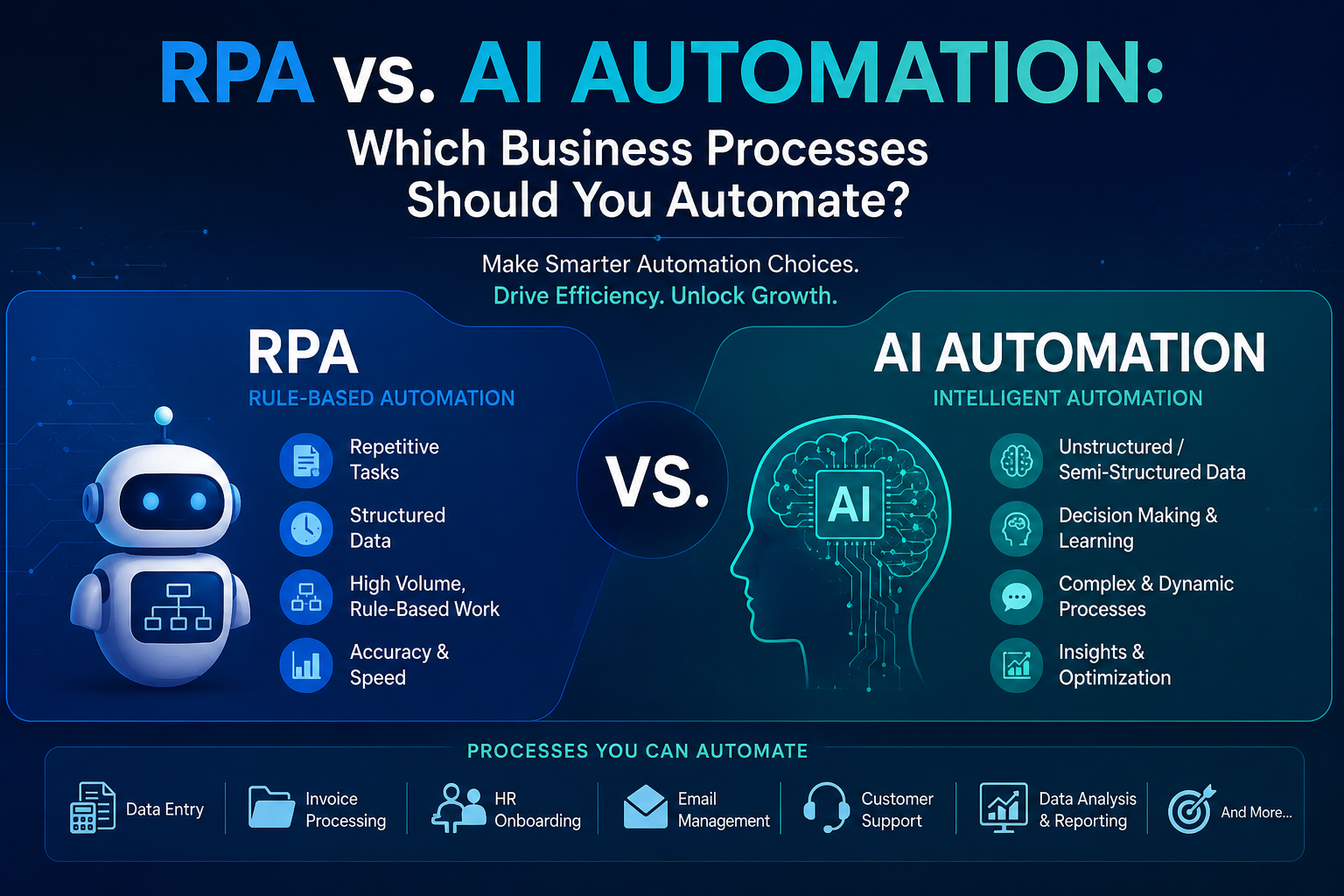
RPA is highly effective for structured, repetitive, rules-based activities. AI automation becomes more valuable when processes involve unstructured information, pattern recognition, natural language, predictions, or decisions that cannot easily be expressed through fixed rules.
Choosing the right technology is important because using sophisticated AI for a simple repetitive task can add unnecessary complexity, while forcing traditional RPA onto a process that requires judgment can create fragile automation. Recent research also suggests that RPA and AI can complement each other rather than being mutually exclusive technologies.
What Is RPA?
Robotic Process Automation (RPA) uses software bots to perform predefined digital tasks according to specific rules and workflows.
An RPA bot can interact with applications, copy and transfer information, enter data, generate reports, update records, and execute repetitive processes without continuous human intervention.
RPA works best when a process is:
- Repetitive
- Rule-based
- Predictable
- High-volume
- Structured
Dependent on clearly defined inputs and outputs
Common RPA Use Cases
Businesses can use RPA for:
- Data entry and data transfer
- Invoice processing
- Payroll calculations
- Employee onboarding workflows
- Report generation
- Database updates
- Order processing
- Customer record updates
- Scheduled email notifications
- Data reconciliation
For example, if employees regularly move customer information from one business application to another using the same sequence of steps, RPA can automate that workflow efficiently.
What Is AI Automation?
AI automation combines automation technologies with artificial intelligence to handle processes that require a degree of interpretation, prediction, classification, or decision support.
Unlike traditional RPA, AI-powered automation can work with less structured information such as emails, documents, conversations, images, and natural-language requests.
AI automation can help businesses:
- Understand customer messages
- Classify documents
- Extract information from invoices
- Predict demand
- Detect unusual transactions
- Analyze customer sentiment
- Recommend next actions
- Summarize large amounts of information
- Identify potential risks
- Support complex decision-making
This makes AI automation particularly useful for processes where the input or outcome can vary.
RPA vs. AI Automation: Key Difference
The simplest way to understand the difference is to look at process variability.
| Factor | RPA | AI Automation |
|---|---|---|
| Process type | Rule-based | Intelligent/variable |
| Data | Structured | Structured + unstructured |
| Decision-making | Predefined rules | AI-assisted interpretation |
| Predictability | High | Medium to variable |
| Best for | Repetitive tasks | Complex or cognitive tasks |
| Typical inputs | Forms, databases, spreadsheets | Emails, documents, text, images |
| Human involvement | Low for standard workflows | Human review may be needed for exceptions |
| Example | Copying data between systems | Reading an email and determining the appropriate action |
The distinction is increasingly important as businesses adopt intelligent automation. Current industry discussions emphasize that stable, rules-based processes are generally better suited to RPA, while variable workflows requiring interpretation are better candidates for AI-powered automation.
Which Business Processes Should You Automate With RPA?
1. Data Entry and Data Transfer
If employees spend hours entering the same information into multiple systems, RPA can automate the process.
For example:
CRM → ERP → Accounting System
Instead of manually copying information between applications, an RPA bot can transfer predefined data automatically.
2. Invoice Processing
Businesses handling large volumes of standardized invoices can use RPA to:
- Collect invoices
- Enter invoice information
- Match purchase orders
- Update accounting systems
- Trigger approval workflows
- Generate notifications
If invoices contain predictable structures, RPA can provide an efficient solution.
3. Payroll and HR Administration
Routine HR processes are strong RPA candidates.
Examples include:
- Employee data updates
- Attendance data transfer
- Payroll calculations
- Leave record updates
- Document generation
- Employee onboarding steps
4. Recurring Reports
RPA can collect data from different systems, compile it into predefined reports, and distribute those reports automatically.
This is particularly useful for finance, operations, sales, and management reporting.
5. Customer Data Management
Businesses can automate repetitive CRM activities such as:
- Updating customer records
- Assigning predefined categories
- Synchronizing customer information
- Generating standard notifications
- Updating sales pipeline fields
Which Processes Should You Automate With AI?
1. Customer Support
AI automation can analyze customer questions, identify intent, generate responses, and route complex requests to the appropriate team.
For example, an AI system can distinguish between:
- Product questions
- Technical problems
- Billing issues
- Complaints
- Sales inquiries
This goes beyond simply following a fixed workflow because the system must interpret language.
2. Document Processing
Many business documents are not perfectly standardized.
AI can extract and interpret information from:
- Contracts
- Invoices
- Purchase orders
- Insurance documents
- Applications
- Emails
- Business reports
AI-powered document processing can then send the extracted information into downstream workflows.
3. Fraud and Anomaly Detection
Traditional rules can identify predefined conditions, but AI can analyze patterns across large datasets to identify unusual behavior.
This can be useful in:
- Banking
- Fintech
- Insurance
- E-commerce
- Cybersecurity
4. Sales Lead Qualification
AI automation can analyze lead information, communication history, customer behavior, and other signals to help prioritize prospects.
Instead of simply assigning every lead according to a fixed rule, AI can support more dynamic lead scoring and routing.
5. Predictive Business Processes
AI automation is particularly valuable when businesses need to predict what might happen next.
Applications include:
- Demand forecasting
- Predictive maintenance
- Customer churn prediction
- Sales forecasting
- Inventory optimization
- Risk analysis
RPA and AI Automation Can Work Together
Businesses do not always have to choose one technology.
A powerful approach is to combine RPA + AI.
Consider invoice processing.
AI can:
- Read the invoice.
- Extract relevant information.
- Identify invoice type.
- Detect unusual information.
- Determine whether additional review is required.
RPA can then:
- Enter the extracted information into the ERP.
- Update accounting records.
- Trigger approval workflows.
- Send notifications.
- Archive the document.
- This creates an end-to-end intelligent workflow.
Research published in 2026 examining the combined use of RPA and AI found that both technologies can improve efficiency independently, while their combination can also support additional business performance outcomes.
A Practical Framework for Choosing the Right Automation
Before automating a process, ask these questions:
Question 1: Is the process highly repetitive?
If employees perform the same steps repeatedly, RPA may be the right starting point.
Question 2: Are the rules clearly defined?
If the process can be described using straightforward "if/then" rules, RPA is usually a strong candidate.
Question 3: Does the process involve unstructured data?
If employees need to read emails, documents, conversations, or images, consider AI automation.
Question 4: Does the process require judgment?
If the workflow requires interpreting context or identifying patterns, AI may provide greater value.
Question 5: How frequently do exceptions occur?
A process with few exceptions may be suitable for RPA. A process with frequent variations may benefit from AI-assisted automation and human oversight.
Question 6: What is the business impact?
Prioritize processes that can deliver measurable improvements in:
- Cost
- Productivity
- Processing time
- Accuracy
- Customer experience
- Revenue
- Compliance
Processes That Should Not Be Automated Immediately
Automation should not begin simply because a process is repetitive.
Avoid automating processes that:
- Are poorly documented
- Frequently change
- Have unclear ownership
- Contain unreliable data
- Depend heavily on human judgment
- Have no measurable business value
- Create significant compliance risks without appropriate controls
Automating a broken process can simply make the broken process faster.
Businesses should first simplify and standardize the workflow, then determine whether RPA, AI, or a combination of both is appropriate.
How to Build an Effective Automation Strategy
A successful automation strategy should follow a structured approach.
Step 1: Map Existing Processes
Document how work currently moves between employees, applications, databases, and departments.
Step 2: Identify Automation Opportunities
Look for processes with high transaction volumes, repetitive work, long processing times, and frequent manual errors.
Step 3: Classify the Process
Determine whether the workflow is:
Rules-based → RPA
Variable and interpretation-heavy → AI automation
Mixed → RPA + AI
Step 4: Start With a High-Value Pilot
Instead of automating an entire department at once, select one process with measurable outcomes.
Step 5: Measure ROI
Track metrics such as:
- Hours saved
- Processing time
- Error reduction
- Cost per transaction
- Employee productivity
- Customer response time
Step 6: Scale Gradually
Once the initial automation proves successful, expand it across related workflows and departments.
The Future of Business Automation
The future is unlikely to be about RPA versus AI. Instead, businesses will increasingly use different automation technologies together.
RPA can handle deterministic execution. AI can interpret information and support decisions. Workflow orchestration can connect these capabilities across business applications.
This layered approach allows companies to automate routine activities while reserving human expertise for situations that genuinely require judgment.
For organizations pursuing digital transformation, the objective should therefore not be to automate everything. The objective should be to automate the right processes with the right technology.
Final Thoughts
RPA and AI automation solve different categories of business problems.
Choose RPA when:
- Processes are repetitive.
- Rules are clearly defined.
- Data is structured.
- Workflows are predictable.
Choose AI automation when:
- Data is unstructured.
- Processes require interpretation.
- Decisions involve patterns or context.
- Workflows contain significant variation.
Choose both when:
AI is needed to understand or classify information.
RPA is needed to execute standardized downstream actions.
The most successful automation strategies begin with the business problem rather than the technology. By identifying where repetitive work, manual decision-making, and process bottlenecks are limiting growth, organizations can build automation systems that improve efficiency without adding unnecessary complexity.
For businesses looking to modernize their operations through AI, software, cloud, ERP, CRM, and automation solutions, RIOTECH Softwares provides technology solutions designed to support digital transformation and business growth.
Explore RIOTECH Softwares: www.riotechsoftwares.com
Frequently Asked Questions
Is RPA better than AI automation?
Neither is universally better. RPA is better for predictable, rule-based processes, while AI automation is more appropriate for processes involving interpretation, unstructured data, or variable decisions.
Can RPA and AI be used together?
Yes. AI can interpret information and make recommendations, while RPA can execute predefined actions across business applications.
What is the best process to automate first?
Start with a high-volume, repetitive process that has clear rules, measurable costs, and a relatively low level of complexity.
Can AI replace RPA?
AI does not necessarily replace RPA. In many enterprise workflows, AI and RPA can complement each other, with AI handling interpretation and RPA handling deterministic execution.
How can businesses calculate automation ROI?
Businesses can compare the current cost and time required for a process with the expected cost and time after automation. Error reduction, productivity improvements, faster processing, and improved customer experience should also be considered.